
Activating your licence
After you buy, Gumroad emails you a licence key. Open Polychrome, click Licence in the top right corner, paste your key (1) and press Activate (2). That's it!
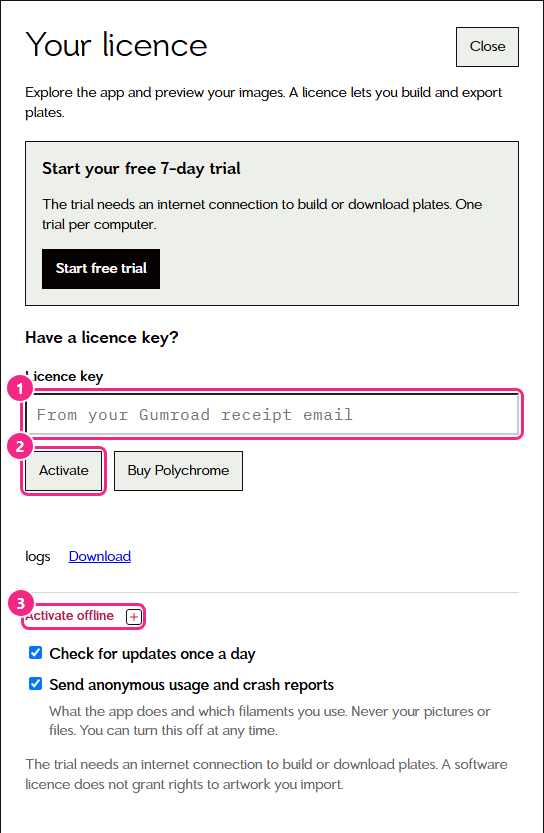
Don't have a key yet? Buy Polychrome in that same window takes you to the shop.
You don't need a licence to look around. You can add filaments, calibrate and preview your pictures without one. To build and export plates from your own pictures, start the free trial or activate a licence. Without either, the build button says Activate to build or start trial.
One licence works on up to three computers, in any mix of Windows and Mac. Activating again on the same computer, after a reinstall for example, doesn't use up another one.
The free trial
The first time you open Polychrome on a computer without a licence, it offers a free seven-day trial. The seven days start when you press Start free trial, so press Look around first if you want to explore before the clock starts. You can start it later from the Start your free 7-day trial section of the licence window.
During the trial you can build and print plates from your own pictures. A chip next to the licence button shows the trial is on. The trial needs an internet connection to build or download plates, and there is one trial per computer. When it ends, your plates and files stay yours, and you can buy a licence to keep building.
Usage reports
Under Check for updates once a day in the licence window there's Send anonymous usage and crash reports. It tells me what the app does and which filaments you use, never your pictures or files, and you can untick it at any time, during the trial or with a licence. The privacy policy lists exactly what is sent.
No internet on that computer?
No problem. Open Activate offline (3). It shows this computer's install code. On any other device, go to activate.polychrome3d.com, enter your licence key and that install code, and it gives you a file. Bring that file back and import it here.
One thing to know: Polychrome needs to get online once, some time between one and four weeks after you activate, to finish setting up your licence. It downloads a public list of refunded licences and sends nothing about you. If it hasn't managed that by four weeks, building new plates pauses and the build button says Connect to build until it connects once. Your plates and data are untouched.
If it doesn't work
Write to [email protected] and tell me what you saw. It really helps if you attach the app's log: there's a Download link next to logs in this same window.